AI-Powered Search for Craft CMS with Meilisearch


Quickly add AI-powered search to Craft CMS with Meilisearch—a fast, open-source search engine that blends classic keyword search with smart semantic results.
I've been on a bit of an "embeddings and AI search" kick this year. I recently stumbled across Meilisearch; a fast and open-source search engine.
Melisearch has tons of features. Typo tolerance, advanced ranking algorithms and custom synonym lists. Its simple setup and robust language support (like PHP) make it an ideal choice for Craft CMS projects.
The RESTful API is also compatible with Algolia's open-source instantsearch.js library and in many cases can serve as a drop in replacement to Algolia.
But what I'm most excited about is Meilisearch's built in vector and hybrid search offerings. 🤩
When combined with DDEV for local development, you can rapidly build a production ready vector search experience.
In this guide, we'll walk through integrating Meilisearch into a Craft CMS project using DDEV. We'll start with basic setup and indexing, then dive into the exciting part: AI-powered hybrid search using embeddings.
- Introduction to Meilisearch: Key features like vector search, hybrid search, real-time results, and easy setup.
- Why Meilisearch is perfect for Craft CMS: A powerful, self-hostable search solution that complements Craft's content management capabilities.
- Benefits of DDEV: How DDEV simplifies our local development environment.
What you'll need in advance #
- DDEV installed on your machine (or a knack for rolling your own Docker containers).
- An OpenAI API key for generating embeddings. You can also use other services like Google, but OpenAI's API is one of the easiest to get started with.
Not sure what embedder to pick? Check out Meilisearch's guide
Semantic or Keyword search? Why Not Both! #
Semantic search uses AI to grasp the intent and context behind your query—not just the exact words. It shines when searches are vague or descriptive, like looking for a "summer-themed shirt" without knowing the product name.
But for exact product codes or unique names, keyword searches are usually quicker and more dependable.
That’s where hybrid search shines. It combines the nuance of semantic search with the accuracy of keyword search, handling conversational queries smoothly while boosting exact matches.
Step 1: Set Up DDEV with Meilisearch #
You could experiment with a vanilla PHP project if you like, but this article uses Craft CMS to store entries.
First, let's create a new DDEV based Craft project. Follow along with the offical Craft CMS installation guide.
With DDEV and Craft CMS up and running, you can now install the Meilisearch DDEV addon (GitHub).
# Install the addon
ddev add-on get kevinquillen/ddev-meilisearch

# Restart ddev
ddev restart
This creates a Docker Compose file that uses the offical Meilisearch Docker Image.
Next, you'll need to add a few variables to your .env file.
# This is the URL access the meilisearch container from within DDEV
MEILISEARCH_URL="http://meilisearch:7700"
# This key can be used for admin actions & searches
MEILISEARCH_KEY="ddev"
# Your OpenAI API key
OPENAI_KEY="*********"
Is it working? #
DDEV exposes the Meilisearch web interface on a specific port. You can find it by running ddev describe.
It should be something like https://<your-project>.ddev.site:7701.
When you open this URL, it will prompt for your API key. Use the one from your .env file (ddev). You should see a clean, empty dashboard, confirming that Meilisearch is up and running!
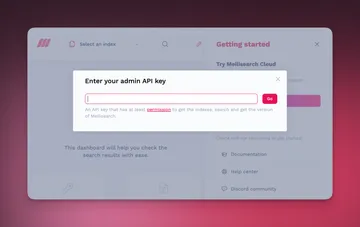
Step 2: Our First Meilisearch Experiments #
Before we install a plugin to sync our Craft entries, it’s a good idea to get a feel for the Meilisearch PHP API directly. This helps in understanding what the plugin will be doing under the hood.
First, install the official Meilisearch PHP client:
ddev composer require meilisearch/meilisearch-php
Create a Craft Console Command #
For quick experiments, I love using Craft's console commands to execute code. The Generator plugin, which comes with new Craft installs, makes creating modules and commands a breeze.

First, create a new module. We'll give it an ID of meilisearch.
ddev craft make module
Now, create a console command within that module.
ddev craft make command --module=meilisearch
Let's name our command index since we'll be interacting with a Meilisearch index. This will allow us to run commands like ddev craft meilisearch/index/sync.
Sync Your First Index #
Let's add some data. We'll create a kitchen index and populate it with a list of common kitchen items.
💡
LLMs are great at creating dummy content. Ask your tool of choice to make a PHP array with 100 unique kitchen items.
<?php

namespace modules\meilisearch\console\controllers;

use Craft;
use craft\console\Controller;
use craft\helpers\App;
use Illuminate\Support\Collection;
use Meilisearch\Client;
use yii\console\ExitCode;

class IndexController extends Controller
{
    /**
     * Boilerplate to create a Meilisearch client.
     * We'll be using this a lot.
     */
    private function getClient(): Client
    {
        return new Client(
            url: App::env('MEILISEARCH_URL'),
            apiKey: App::env('MEILISEARCH_KEY'),
        );
    }

    /**
     * Sync the kitchen index with some test data.
     * * ddev craft meilisearch/index/sync
     */
    public function actionSync(): int
    {
        $this->stdout("Sending docs to the 'kitchen' index.\n");

        $client = $this->getClient();
        $index = $client->index('kitchen');

        $kitchenObjects = Collection::make([
            'spoon',
            'frying pan',
            'fork',
            'knife',
            'plate',
            'bowl',
            // ... Ask an LLM to generate a longer list for you!
        ]);

        // Turn our list of objects into Meilisearch documents.
        $documents = $kitchenObjects->map(fn($title, $index) => [
            // Meilisearch documents need consistent IDs
            // so that existing items can be updated.
            'id' => $index + 1,
            'title' => $title
        ]);

        // The kitchen index is automatically
        // created if it doesn't exist.
        $index->addDocuments($documents->all());

        $this->stdout("Done!\n");

        return ExitCode::OK;
    }
}
Check Your Work #
Run the console command, then open the Meilisearch UI in your browser to see that your items were indexed correctly (run ddev describe if you forgot the URL).
ddev craft meilisearch/index/sync
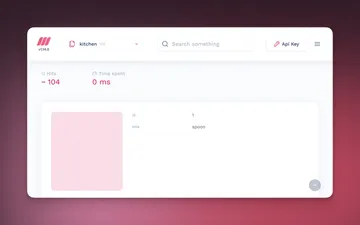
Perform a Search #
You can run a search via PHP with a few short lines of code.
<?php

// Inside your IndexController class...

/**
 * Run a search against the kitchen index.
 * ddev craft meilisearch/index/search "your search query"
 */
public function actionSearch(string $query): int
{
    $client = $this->getClient();
    $results = $client->index('kitchen')->search($query);

    Craft::dump($results);

    return ExitCode::OK;
}
Now, run a search from your terminal. Notice that typo-tolerance is enabled right out of the box.
ddev craft meilisearch/index/search "fring pan"
With barely any setup, you get a fast and fuzzy search that can be further customized with filters, facets, and custom synonyms.
But what I'm most excited about is Meilisearch's Vector Search (also known as semantic or embeddings based search). If you're new to embeddings, I'd recommend reading my previous article about our "Radical RAG" hackathon.
Step 3: Adding an Embedder for AI Powered Search #
An "embedder" is a Meilisearch feature that automatically converts your document text into vectors (embeddings) using a specified AI model.
Let's configure an embedder for our kitchen index.
// Inside your IndexController class...

/**
 * Updates settings for the kitchen index.
 * Needs to run each time you change this function.
 * ddev craft meilisearch/index/sync-settings
 */
public function actionSyncSettings(): int
{
    $client = $this->getClient();
    $result = $client->index('kitchen')->updateEmbedders([
        // ⤵︎ This is the name of your embedder; you'll use it later.
        'openai' => [
            "source" => "openAi",
            "model" => "text-embedding-3-small",
            "apiKey" => App::env('OPENAI_KEY'),
            // This template transforms your document into a string for the embedding model.
            "documentTemplate" => "An object used in a kitchen named '{{doc.title}}'",
        ],
    ]);

    Craft::dump($result);

    return ExitCode::OK;
}
Running sync-settings configures this embedder for your index. Meilisearch will now automatically create embeddings for any new or updated documents using its own asynchronous background tasks.
# Sync your new embedder settings
ddev craft meilisearch/index/sync-settings

# Re-sync your documents to generate the embeddings for existing items
ddev craft meilisearch/index/sync
Update the search command #
Our search command needs a few small updates to make use of the new embedder. We'll enable hybrid search, which mixes traditional keyword search with semantic vector search.
// Inside your IndexController class...

/**
 * Run a search against the kitchen index.
 * ddev craft meilisearch/index/search "your search query"
 */
public function actionSearch(string $query): int
{
    $client = $this->getClient();
    $results = $client->index('kitchen')->search(
        $query,
        [
            // We'll talk about these more further on in the article.
            // Having a threshold helps keep out irrelevant vector results.
            'rankingScoreThreshold' => .001,
            // Useful when debugging your threshold
            'showRankingScore' => true,
            'showRankingScoreDetails' => true,
            'hybrid' => [
                // 0 = keyword only search, 1 = semantic, 0.5 = hybrid
                'semanticRatio' => 0.5,
                'embedder' => 'openai',
            ],
        ]
    );

    Craft::dump($results);

    return ExitCode::OK;
}
As the Meilisearch docs explain, semanticRatio allows you to blend the two search types:
semanticRatio = 0— it’s a full-text searchsemanticRatio = 1— it’s a pure vector search0 < semanticRatio < 1— it’s a hybrid search
Now that our embedder is configured, you can ask more "fuzzy," conversational questions.
ddev craft meilisearch/index/search "a sharp kitchen tool"

Thresholds? Relevance? Ranking? Distribution? #
Meilisearch gives you several knobs to dial in your search relevance. Your unique use case can produce different results, so there's no single number that works for everybody.
This is why automated AI evals are so essential to building production ready semantic search.
Below are a few options that can shape which documents you see and in what order.
rankingScoreThreshold- The_rankingScoreis a numeric value between 0.0 and 1.0. The higher the_rankingScore, the more relevant the document. Setting even a small number like.001helps keep irrelevant embeddings from slipping through. Learn more about ranking scores here.- Custom Ranking Rules - If you are searching across multiple attributes, you can add them to the ranking rules list. For example, adding
post_date:descwould make newer entries more relevant than older ones. distribution- This settings requires some trial and error and depends on tje embedder you use. According to this Meilisearch blog post, known models (such as OpenAI), automatically have a suitable default distribution applied. Users don’t have to configure it themselves!
Sync Craft Entries with the Meilisearch Connect Plugin #
Our simple example is an awesome proof of concept, but for a real-world project, we want our search content to come directly from Craft and stay in sync automatically.
Luckily, there's a plugin for that: Meilisearch Connect by Foster Commerce.
This plugin handles all the plumbing of syncing entries, and its configuration file makes it easy to set up indexes and embedders.
Here is an example config file (config/meilisearch-connect.php) for an "entrified" version of our kitchen tool search.
<?php

use craft\elements\Entry;
use craft\helpers\App;
use fostercommerce\meilisearch\builders\IndexBuilder;
use fostercommerce\meilisearch\builders\IndexSettingsBuilder;

return [
    /**
     * The host URL used when communicating with the Meilisearch instance.
     */
    'meiliHostUrl' => App::env('MEILISEARCH_URL'),
    /**
     * Meilisearch Admin API key used for updating index settings and syncing index data.
     */
    'meiliAdminApiKey' => App::env('MEILISEARCH_KEY'),
    /**
     * ⤵︎ For production, you would use a non-admin key for search, but for local dev you can use the same key.
     */
    'meiliSearchApiKey' => App::env('MEILISEARCH_KEY'),

    /**
     * A list of indices that can be created and/or searched.
     */
    'indices' => [
        /**
         * The array key ('kitchen') is the handle you'll use when running commands
         * or searching in Twig templates.
         *
         * e.g., craft meilisearch-connect/sync/index kitchen
         */
        'kitchen' => IndexBuilder::fromSettings(
            IndexSettingsBuilder::create()
                ->withEmbedders([
                    'openai' => [
                        "source" => "openAi",
                        "model" => "text-embedding-3-small",
                        "apiKey" => App::env('OPENAI_KEY'),
                        "documentTemplate" => "An object used in a kitchen named '{{doc.title}}'",
                    ],
                ])
                ->build()
        )
            // Use an env variable so the index name is unique per environment.
            ->withIndexId('kitchen_' . App::env('CRAFT_ENVIRONMENT'))
            ->withElementQuery(
                query: Entry::find()->section('kitchen'),
                transformer: static function(Entry $entry) {
                    return [
                        'id' => $entry->id,
                        'title' => $entry->title,
                        'url' => $entry->url,
                    ];
                }
            )
            ->build(),
    ],
];
The Meilisearch Connect plugin also provides a handy Twig variable that makes searching your index incredibly easy.
{% set searchResults = craft.meilisearch.search(
    'kitchen',
    query,
    {
        hitsPerPage: 25,
        hybrid: {
            semanticRatio: 0.5,
            embedder: 'openai',
        }
    }
) %}

{% for hit in searchResults.hits %}
    <a href="{{ hit.url }}">{{ hit.title }}</a>
{% endfor %}
Meilisearch Makes Semantic Search a Breeze #
I hope this article shows you just how easy it is to get started with Meilisearch's vector and semantic features. It's a well crafted tool and a joy to work with.
The combination of Meilisearch and the Connect plugin makes spinning up a vector database feel as simple as writing a config file.


