Using Claude Code More Intentionally

Prompts are ephemeral. Infrastructure compounds. A practical guide to setting up Claude Code so it works with your project, your conventions, and your process — not just the task in front of you.
Most people who try Claude Code start the same way: open a terminal, describe a problem, watch it generate some files, feel vaguely impressed, then slowly drift back to their old workflow because it doesn't quite fit into how they actually work. The problem isn't really Claude Code itself. It's that we treat it like a smarter ai chat - something you prompt when you're stuck - rather than a collaborator you set up to work with your project, your conventions, and your process.
This article is about the setup - the effort you can put in that gets you big returns. Specifically, the handful of things that changed how I use Claude Code from "occasionally useful" to "runs in the background while I do something else." I'll use a small demo project throughout - a Node.js CLI task manager called task-pilot to make the ideas concrete.
The core insight: context is a resource #
Claude Code's context window isn't infinite. Every session starts fresh. Every sub-agent spawned during a run starts fresh. If you treat context like an unlimited whiteboard, you'll constantly be re-explaining your project, your conventions, and what you're trying to do.
The developers getting the most out of Claude Code aren't the ones writing the most clever prompts. They're the ones who invest in the environment — the files, structures, and tools that mean Claude always has what it needs without you having to provide it manually every time.
Think of context as infrastructure. The sections below are the specific pieces of that infrastructure: a project memory file, a pattern for externalizing plans and artifacts to disk, skills that encode repeatable expertise, hooks that connect Claude to your existing workflow, and a few features that change the practical experience of longer tasks.
Start with CLAUDE.md — but write it properly #
CLAUDE.md is the first file Claude Code reads when it opens your project. Most people treat it like a system prompt. Maybe a few sentences describing what the project does. That's underselling it significantly.
A better mental model: CLAUDE.md is an onboarding document for a smart new hire who forgets everything between shifts. It should answer the questions you'd answer in a first day walkthrough: project structure, naming conventions, patterns to follow, things not to touch, how tests are run and written, what the exit codes mean.
For task-pilot, the thin CLAUDE.md we started with looked like this:
# task-pilot
A CLI tool for managing local tasks in a JSON file.

## Conventions
<!-- TODO: fill this out — naming, error handling patterns, test approach -->
After asking Claude Code to interview the codebase and improve it, we got a full document covering the task schema, storage conventions, test patterns, CLI command structure, and more.
The interesting thing: it documented saveTasks() normalizes every task on write — a behavior buried in storage.js that you'd only know from reading the code carefully. Which it did.
That CLAUDE.md now means every new session (and every parallel instance) starts with a complete picture of the project. You write it once and it will remember the important details you need it to across all future sessions.
One sibling worth knowing about: nested CLAUDE.md files. Where your root CLAUDE.md acts as onboarding docs for a new hire, a subdirectory CLAUDE.md is like a laminated instruction sheet bolted to a specific machine; explicit guidance for anyone working in that exact spot. Drop one into a directory with legacy code, sensitive security implications, or just any area that needs a little extra explanation. It's useful documentation for both humans and ai agents. An added benefit: Claude Code will only pull it in when it actually needs to work there – keeping your context as clear as possible.
.claudeignore: what Claude doesn't see matters too #
This one is easy to overlook. Claude Code respects a .claudeignore file structured exactly like .gitignore. Excluding node_modules, build artifacts, generated files, and data directories keeps context clean and focused.
For task-pilot we excluded the data/ directory entirely. The actual task data is user-specific and irrelevant to any coding task. A comment in the .claudeignore explains why, which is useful both for humans and for Claude when it reads the project:
# We exclude /data because task data is user-specific and
# not relevant context for code tasks
What Claude doesn't see is as important as what it does. Context hygiene isn't just a performance concern, it also shapes what Claude focuses on.
Externalizing artifacts: context that outlives the session #
Before getting into specific tools and skills, there's a pattern worth understanding that makes everything else work better: writing important outputs to disk rather than leaving them in the conversation.
Claude Code's context window resets between sessions. In a long agentic run it can also fill up mid-task, forcing Claude to summarize and compress earlier parts of the conversation. If your plan, your decisions, and your progress state only exist in chat history, they're fragile — subject to compression, loss, and the hard limit of the window itself.
The alternative is to treat files as your persistent memory layer. Any artifact worth referencing later: a plan, a product requirements document (PRD), a spike document, a decision log, a progress checkpoint - they get written to disk immediately. The next session reads the file, not the chat history. Parallel sessions read the same file simultaneously. Sub-agents get pointed at the file directly. Nothing important lives only in the conversation.
Skills: packaging your expertise #
This is the one that changed my workflow most meaningfully.
Skills are markdown files that define a repeatable, invocable process. It's like packaging up your expertise (or lack of) and saving it to distribute to your agent. You store them in .claude/skills/, each in its own folder with a SKILL.md. The frontmatter gives Claude Code the metadata it needs: name, description, argument hint, allowed tools.
The right question when building a skill: what do I keep re-explaining to Claude? That is your candidate for a skill.
I'll walk through two that I used in the task-pilot demo.
The prd skill #
Sometimes you leave a placeholder for yourself to come back to later. You create a feature request with no acceptance criteria, no data model, no edge cases. The code Claude writes based on it will be underspecified. The prd skill bridges that gap. Running /prd #1 against task-pilot's placeholder issue fetches it via the GitHub CLI, reads the codebase, and produces a full product requirements document: problem statement, goals and non-goals, user flows, data model, open questions.
The more interesting result: the generated PRD included a "Current State" note at the bottom catching that basic priority support was already implemented in the app. It cross-referenced the issue against the code rather than just filling a template. Output is written to docs/prds/ — immediately available as input for the actual implementation session.
The debug skill #
task-pilot has a bug: storage.js silently truncates any task description over 200 characters on every save. No error thrown, operation looks successful, data loss only visible by inspecting the JSON file directly. Issue #3 describes the symptom with no debug, logging, or line numbers to go off.
Running /debug #3 produces a structured diagnostic report before touching any code and ranked hypotheses.
This is not a Claude Code issue — it's a bug in the project code. No relevant errors in the debug log.

  Root cause: storage.js:24 — entry.description = entry.description.slice(0, 200) runs on every save, not just on creation. When
  completeTask() calls saveTasks(), all existing descriptions get re-truncated to 200 chars, silently corrupting any longer
  description.

  The fix: remove the truncation from saveTasks() and validate at input time in addTask() instead — or remove the 200-char limit
  entirely. Want me to implement the fix?
It then stops and asks whether to implement the fix. That pause is intentional — diagnosis and implementation are separate decisions, and seeing the reasoning before approving it is the point.
Skills compound — and so does the library you build #
These are just two examples. The real power is what happens as you accumulate them — each skill is a process you never have to re-explain, each one increasing your effectiveness.
Over time your skills directory stops looking like a collection of prompts and starts looking like a team's knowledge, bottled. A new developer joining a project can run /prd, /debug, and /spike on day one and immediately work at the level it took you months to reach. That's the compounding effect of skills done well — not just that you get faster, but that the expertise becomes transferable.
Connecting to your tools: CLI integration and MCP #
Claude Code can call any CLI tool available in your terminal, which makes the GitHub CLI (gh) a natural starting point. You can point Claude at an issue, let it read the spec, implement against it, and open a PR — all in one prompt, all without leaving the terminal.
For task-pilot's Issue #2 — a feature request with acceptance criteria, data model changes, CLI flag specs, and backward compatibility requirements — the prompt was:
Read GitHub issue #2 using the gh cli, then implement everything described.
Make all necessary changes to tasks.js, storage.js, cli.js and format.js,
write tests covering the acceptance criteria, then open a PR against main.
It fetched the issue, read the codebase, touched four files, and wrote 17 new tests covering the new feature addition, overdue detection edge cases. All 27 tests passed — 17 new, 10 existing. The acceptance criteria in the issue drove the test coverage directly.
That said, CLI integration via gh is really the floor, not the ceiling. The more powerful version of this is MCP — Model Context Protocol.
Where the GitHub CLI lets Claude run shell commands against GitHub, an MCP server gives Claude structured, authenticated access to an external system as a set of typed tools it can call directly. The difference matters: typed inputs, scoped permissions, consistent interfaces, and no reliance on parsing CLI output. Claude isn't shelling out and hoping, it's calling a well-defined API.
For a project management workflow, the benefits are significant. With the GitHub MCP server, Claude can read issues, fetch file contents at a specific ref, check PR review status, and reason about the state of your repository. It's not just executing git commands.
MCP Servers work with the tools your team already uses — Slack for async context, Notion for documentation, GitHub for tickets, or even your own internal APIs. MCP is the mechanism by which Claude Code stops being a smart terminal assistant and becomes an agent with actual access to your working environment. The developers investing in MCP integrations now are building something that will compound as the ecosystem grows; every major tool will have an MCP server eventually, and knowing how to wire them together is increasingly a core skill.
Hooks: participating in your existing workflow #
Hooks are shell commands that Claude Code fires automatically at defined points in its lifecycle. Most people don't know they exist.
The most immediately useful pattern: a post-task hook that runs your test suite automatically every time Claude finishes editing code. If tests fail, Claude sees the output and knows to fix before considering the task done. You don't have to tell it to run tests and try again when they fail — it just happens.
Other practical uses: auto-committing to a working branch after each completed subtask (giving you a clean git history of what Claude did and when) or running a lint check before Claude starts work to ensure the environment is clean.
Hooks are how Claude Code participates in your existing workflow rather than sitting beside it. It stops being a separate ai tool and starts being a step in your pipeline.
Remote control and model switching #
Two features worth mentioning that change the experience of longer running tasks.
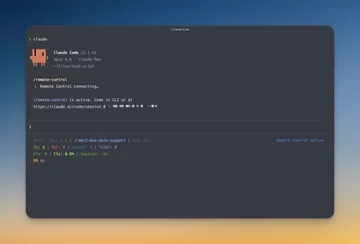
claude rc (remote control) lets you start an agentic run on your machine and supervise it from your phone via the Claude app. It's easily my favorite new feature. You're not babysitting Claude; you're checking in. It keeps running while you're away. This changes your relationship with long-running tasks in a meaningful way: you can kick off a substantial job, step away, and get notified when it's done.
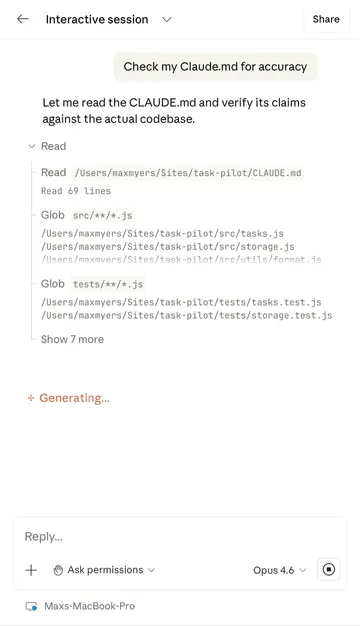
Model switching matters when cost is a concern. Not every task needs your most capable model. Haiku for mechanical work like renaming files, generating boilerplate, formatting output. Sonnet for most coding tasks. Opus for genuine reasoning and thinking; architecture decisions, writing the CLAUDE.md itself, debugging something complex. In a normal workflow this can add up: lower cost, lower latency, no quality loss on the steps that don't require it.
The compounding effect #
Each of these things is useful on its own. Together they create something different: a Claude Code setup that reflects your project's specific knowledge and your own expertise, not generic AI capability.
After a few months of building skills, the CLAUDE.md becomes an accurate picture of how you actually work. The .claudeignore reduces your project's noise. The hooks run your real test suite. The skills encode the processes you'd otherwise explain from scratch every time.
That's the actual investment. Not better prompts — a better environment for the prompts to run in.
The task-pilot demo repo and all skills referenced in this post are available on GitHub. The prd, debug, and spike skills are in .claude/skills/ if you want to adapt them for your own projects.


