Pointless explorations of Obsidian & Claude Code



Joshua Pease, Platform Development Technical Director,
Jackson Fox, VP of UX & Design, and
Natalie Dixon, Junior Application Developer
Article Category:
Posted on
Not only do AI agents like Claude Code and Codex excel at software development, they are also powerful knowledge work assistants.
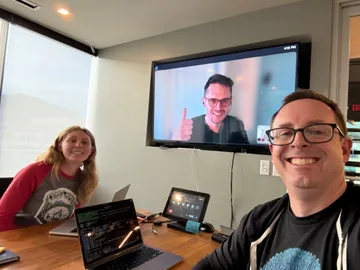
At Viget, we have a sizable group of Obsidian enthusiasts. During this year's Pointless Palooza hackathon, our three-person team of Natalie, Jackson, and Joshua (that's me!) explored ways to integrate LLM features into Obsidian and empower our coding agents to work within our content vaults. Each of us brought different experience levels and workflows to the table, but we shared two things: curiosity about pushing Claude Code to its limits and an Obsidian habit that keeps on growing.
Claude Code + Obsidian #
If you've never used it, Obsidian is a local-first, Markdown-based knowledge management app. It's flexible, extensible, and an excellent digital junk drawer. Obsidian vaults are just Markdown files and folders on your computer. It's the perfect fodder for an AI agent to churn through.
Tools like Claude Code are surprisingly effective as a general agent for knowledge work. Open it inside of an Obsidian folder and say: "You're in my Obsidian vault. Let's talk about it." It already knows what Obsidian is, how Markdown works, and what frontmatter means. For ad hoc queries, this requires zero setup. Being grounded in a local filesystem moves you from one-off chat threads to a durable workspace that evolves over time.
Here’s an example: Every Friday, I photograph my Analog to-do list cards and run a Claude skill. It asks me questions about my messy todo list, cross-references my yearly goals and past performance reviews to generate a weekly summary. You could do all these steps without AI, but automation eliminates all the busywork that killed my consistency. This context builds up over time and becomes more useful to Claude as it grows.
The Limits #
Despite their usefulness, an AI agent isn't a silver bullet. Naively pointing Claude Code at a raw vault has real limitations:
- Large vaults are slow. With 3,000-4,000 notes, Claude Code burns through tool calls and tokens just searching for relevant content.
- General-purpose means wasteful. Just now I asked Claude Code to summarize a YouTube video. It used yt-dlp to download a VTT transcript, wrote a Python script to parse the VTT, and finally summarized said transcript. Running ccusage shows this session took almost 500k tokens and would have cost $1.02 in API calls. Claude Code is powerful, but expensive for routine tasks.
- Token budgets disappear fast. A typical Claude Pro subscription can hit usage limits in a single ambitious session, leaving no budget for coding.
What if we could write an Obsidian plugin to help?
Our Pointless Pitch #
We wanted common LLM operations to be automatic and affordable. Summarizing clips, tagging notes, and synthesizing across files could happen inside Obsidian rather than through an expensive, general-purpose agent session.
No more copy-pasting YouTube transcripts. No more burning Claude Pro credits on tasks a $0.001 API call can handle.
What We Built #
We built an Obsidian plugin that connects your web clipper and file tree to cheap, targeted LLM calls. The following two user journeys nicely sum up our plugin's features.
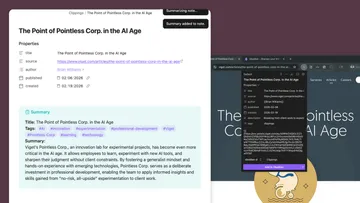
Web Clipper: Auto-Summarize on Save #
At this point in your knowledge work adventure, you're browsing the web and gathering resources to read later or archive for future reference.
The Obsidian Web Clipper already lets you bookmark pages into your vault, but our plugin takes it further. The moment a clipped page lands in your vault, it auto-generates a structured summary and tags. If the clip is a YouTube video (or eventually a podcast URL), the plugin fetches the transcript, appends it to the note, and uses it to inform the summarization task.
Synthesize: Multi-File Prompts #
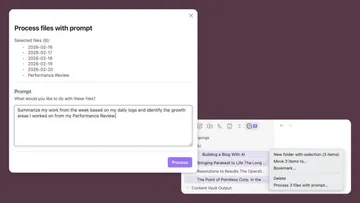
Now that your collection of clippings and reference material has grown, you'll probably want to synthesize that information into new Obsidian notes. Here's how this feature works.
Select one or more files, write a custom prompt (or reuse a saved one), and the LLM creates a new note from your input.
Examples: "Summarize these three articles and give me one snarky take on each." or "Turn this YouTube transcript into a learning guide with clear section headers and with relevant timestamps."
This kind of cross-note synthesis is tedious by hand, wasteful with a coding agent, but trivial with a simple LLM call.
Multi-Select File Explorer (Bonus Plugin) #
The Synthesize feature revealed a frustrating gap in Obsidian. Multi-file prompts require selecting multiple notes, but the file explorer only lets you interact with one file at a time.
As a side quest, Natalie built a separate plugin with checkboxes, count badges, and right-click actions for batch operations.
How We Built It #
The point of Pointless has always been to learn by doing in a focused yet risk-free sandbox. We decided to go all-in on Claude Code and see how far we could get with purely agentic development.
Tech Stack #
The tech stack was mostly straightforward, but a few key choices helped Claude Code work effectively.
TypeScript + Vitest. One of the best ways to set your coding agent up for success is to give it a way to verify its own code. Strongly typed languages and automated tests do exactly that. If your LLM hallucinates a library API, the type checker catches it immediately.
Obsidian Plugin API. Building an Obsidian plugin dictates your tech stack, but we already wanted to use TypeScript, so it's a win-win. A plugin is a couple of TypeScript files and a manifest, compiled down to a single bundle. Symlinking the build output to any Obsidian vault makes live testing painless.
youtubei.js. We used this library for client-side access to YouTube's web
APIs. We hit a few CORS issues, but Claude replaced the default fetch() with
Obsidian's requestUrl() to bypass them.
Vercel AI SDK + AI Gateway. These libraries got us building LLM features fast. Vercel's gateway gives you access to nearly any model you can think of. It's great for hackathons where you need to evaluate multiple LLMs, compare pricing, and pivot fast. As a bonus, Gateway includes $5.00 in free API credits per month — more than enough for a short hackathon.
AI Development Techniques #
The process of working with Claude Code ended up being the most valuable part of this project.
We set two ground rules at the start. Minimal code written by hand and minimal code review. Instead, we focused on manual and automated tests to verify that we were on the right path.
Compound Engineering
The real game-changer was the concept of compound engineering. If you've read much about coding with AI agents, you might have seen folks recommend following a plan → build → review process for each feature.
By chance, I had read this guide on compound engineering a few days before the hackathon. Compound engineering introduces a fourth step called compound.
Whenever you find yourself coaching your LLM through a bug, fixing a common
performance issue, or noticing a pattern that has broad use, run the compound
step at the end of your session.
Compounding updates your AGENTS.md and adds "solutions" docs explaining the issue.
A practical example: Claude kept installing v4 instead of v6 of the Vercel AI SDK, even with an MCP server pulling up-to-date docs. Rather than fix the version manually, we had Claude update its own CLAUDE.md with specific instructions to prevent the mistake for other npm packages. Small investment, permanent payoff.
Dividing Up Work
What shocked us was the speed. Claude Code took us from a three-bullet-point development plan to a working MVP in about thirty minutes. Normally, this would have taken half the hackathon. The speed left us scrambling to come up with new features and figure out how to divide work among three AI-assisted developers, all coding at once.
Like any development project, a bit of planning goes a long way in reducing git conflicts. When our file changes collided, Claude Code did a great job resolving conflicts as well.
We moved fast because the stakes were low. Claude picked some patterns we wouldn't have chosen, like adding structured output schemas to our LLM output without us being aware (that was a fun bug). A more serious project needs tighter guardrails and more thorough review.
Where Do We Go from Here? #
Pointless got us excited about AI agents all over again. They're not just for software development; they're also truly useful for everyday knowledge work.
Writing Claude skills that leverage the new metadata in our Obsidian vaults
opens up powerful workflows. Obsidian's recently released CLI tool also pairs
well with agents that live on the command line. During Pointless, Jackson had
Claude run obsidian help and
write a skill
for interacting with the Obsidian Command Line.
Over the coming weeks and months, we'll continue to refine how we work with Obsidian and Claude Code within our content vaults.
Closing Thoughts from the Team #
Jackson #
I enjoyed the opportunity to expand on my experience using Claude Code for personal projects and collaborate with a team. This project was very fast, but I came away from the experience thinking harder about how to instill good (and consistent) behaviors in our robot friends.
Joshua #
The Plan, Work, Review, Compound loop is what I'm taking away from this project. LLMs need clear instructions and lots of context. Taking the time to help coding agents avoid repeating mistakes pays dividends.
Tools like Claude Code can unlock some big efficiency gains. I don't feel we're at the point where I'd blindly trust AI-generated code on a high-stakes client project. But for a lower-risk project (an MVP or a tool like this Obsidian plugin) it's a fast path from idea to finished product.
Natalie #
I was new to Claude Code and had never used AI for coding at this scale. I found that the QA was quite fun and I never got stuck. I'd identify a bug, describe it vaguely — "sometimes the command doesn't run, maybe it has to do with my cursor being in the title?" — and Claude would have an answer and a fix on the first try.
We were able to modify Obsidian for exactly how we want to use it. When we needed multiple files as input for a content vault command, we realized Obsidian had no good way to select them. So we built the Multi-Select Plugin — a standalone tool, completely separate from the Content Vault Plugin. Tinkering led us to a real UX pain point, and we solved it!


