Moving Your Markup with jQuery Transport

During our work on a responsive news website for WRAL, some design strategies called for custom content placements at various breakpoints. And by custom, I mean custom––the kind of flexible placements where CSS alone is not a realistic or responsible solution.
Reflow Options
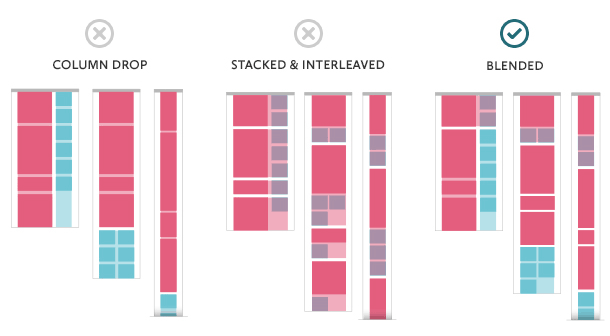
Our team identified a need for a 'blended' solution. We knew that JavaScript would be necessary, but we also wanted to create a framework that was easy for non-JS developers to use. With this in mind, Nate Hunzaker wrote Transport, a small (2kB) and simple jQuery plugin for moving HTML at matching media queries.
How it Works
Transport uses matchMedia (with a polyfill included for older browsers) to check for predetermnined breakpoints. When a match is found, the HTML is appended to the specified destination for that breakpoint.
HTML
 <main id="main"></main>
<footer id="footer"></footer>
<aside id="sidebar">

  <!--
  Transport looks for a pattern in the data-transport attribute:
  [media query key]![jQuery selector to transport to]
  Multiple matches should be delimited by pipes, i.e. '|'
  -->
 <div data-transport="tablet!#main|mobile!#footer">
 <p>
 Breakdown: at tablet, (max-width: 1024px), this is transported to $("#main").
 At mobile, (max-width: 500px), this is transported to $("#footer").
 </p>
 </div>

</aside>
JavaScript
 $('[data-transport]').transport({
    mobile: '(max-width: 500px)'
    tablet: '(max-width: 1024px)'
});
Here is an illustration of how content could transport to a completely different area of the page at the “tablet” breakpoint:

Ease of Use
Transport was designed to require as little JavaScript knowledge as possible. Once the initial script is set up, anyone with a working knowledge of HTML can customize the position of content by editing data-transport attributes.
Download and Demo
jQuery Transport is available on Github. A demo is also available here. Please let us if there are any ways we could improve Transport by opening an issue.
Visit https://viget.com/work/wral for more details about our work on WRAL's site relaunch.


