Building Pointless FLF


Slack-first coordination, agent-driven execution, and the occasional encounter with the Shadow Realm™
Pointless FLF is a Slack-first tool for coordinating our weekly internal live show called Free Lunch Friday (FLF). Think: recurring segments, rotating presenters, and a producer brain trying to keep the whole thing from going off the rails.
The product focus wasn’t “make the show better.” The show is already pretty good. The focus was everything around the show: the coordination overhead that repeats every week, like slot filling, gentle nudges, run-of-show drift, and the constant “wait, what’s the plan right now?” when state is distributed across humans and Slack scrollback.
This is the story of building the app and the workflow used to build it with agents: what worked, what didn’t, where tests helped (later), and what it feels like when your tools have an internal state you can’t inspect.
The problem: the uncertainty tax #
Most of the work isn’t “doing the show.” It’s maintaining shared state: who’s in, what’s next, what changed, and what’s still missing. When the shared state is implicit, the system generates extra traffic, pings, follow-ups, and duplicate questions just to keep reality synchronized.
Every week someone needs to:
- find people to fill “quickshare” slots
- nudge presenters through prep (opt-in, non-annoying… ideally)
- keep a run-of-show coherent as it changes
- handle last-minute swaps without melting the producer
In the baseline workflow, state lives in two places:
- Slack messages (scattered, non-authoritative, and sometimes poetic)
- people’s heads (authoritative, but not queryable)
This works until it doesn’t. The cost spikes right when you want stability: during the live show, when everyone’s attention is already spent.
So the goal was simple: reduce ongoing cognitive load and coordination labor without creating a new job titled “person who maintains the coordination tool.”
Product Philosophy: assist, don’t overwhelm #
I set constraints early and treated them like product requirements, not vibes:
- Assist, don’t enforce. No readiness policing. No mandatory status updates.
- Opt-in by default. It should help even if adoption is partial.
- Tolerate mess. Reordering, missing info, and late changes are all normal, not error states.
- Low-noise. If the tool spams the channel, congratulations: you made Slack worse.
Tools that try to do too much can become more of a hindrance than a help. The “feature ceiling” matters as much as the feature floor.
What I built: #
The system ended up as three pieces, intentionally biased toward Slack.
Slack bot (primary surface) #
Slack already held the social reality of coordination, so the bot needed to live there:
- one weekly anchor message
- the thread is the control plane
- updates via message edits (so the channel doesn’t become bot confetti)
- slot claim/unclaim + producer controls + live “what’s next” state
Web app (producer control + visibility) #
Slack is great for quick actions; it’s not great for “dense editing.” The web app is for:
- producer management
- schedule editing / reordering
- clearer overview of current state for contributors
Notion (optional, read-only archive) #
It’s very easy for a Notion integration to turn into “maintain the Notion integration,” which I expressly didn’t want so the rules were strict:
- read-only
- auto-generated from Slack-backed state
- no manual data entry required, ever
- tool works fully without Notion
The process: #
Agent workflows have a brutal property: they amplify whatever you give them. If the inputs are vague, you don’t get “a vague result”—you get a very confident, very detailed version of the wrong thing. Classic Garbage In, Garbage Out.
So I deliberately didn’t start by “letting the agent code.” I started by tightening the inputs: a PRD, explicit acceptance criteria, and a technical plan that forced decisions into daylight. That up-front definition work wasn’t process theater; it was how I kept the build from iterating quickly in the wrong direction.
ideas → specs → plans → milestones → tasks
This process should be familiar. It’s a pattern that already works outside of agentic workflows but it’s also a superpower. If you want agent-driven development to stay coherent, you need a pipeline that actually produces durable artifacts.
Here’s how I approached it.
1) Ideation → PRD + acceptance criteria (ChatGPT) #
I used ChatGPT early to convert a fuzzy idea into something testable:
- problem framing
- PRD draft
- acceptance criteria
Acceptance criteria are the difference between shipping vibes and shipping something that actually meets its goals.
2) PRD → technical implementation plan (Codex, Plan Mode) #
Next, those docs became inputs for GPT-5.2-Codex in Plan Mode. The job here was not “write code.” It was:
- propose architecture
- surface risks (Slack mechanics, state, integrations)
- iterate on decisions until the plan was coherent and sequenced
3) technical plan → milestones/scopes (Codex + a custom skill) #
I used Codex again for decomposition. I wrote a custom skill that turns the technical plan into milestone-shaped scopes of work.
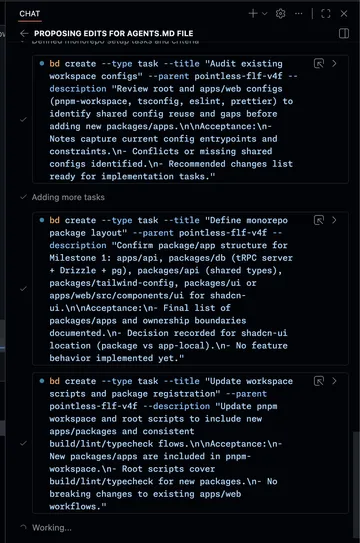
The output wasn’t just a document. It became operational: epics and tasks, ready to execute.
4) milestones → execution (Beads) #
Those tasks were created in Beads, which gave me a real work graph. This mattered because:
- “what’s next?” stopped living in my skull
- tasks had acceptance targets, not just vague intent
- the agent loop stayed anchored to explicit outcomes
Execution: “let’s jam” (custom skill) → verify #
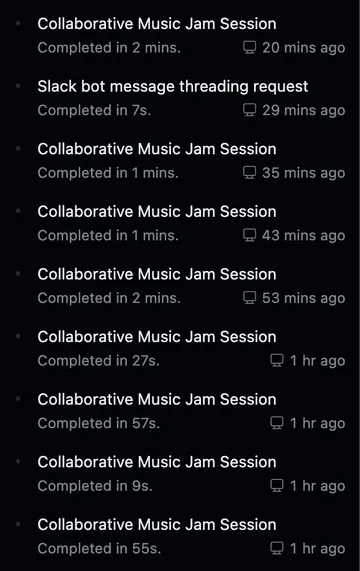
I leaned heavily on a custom skill I wrote and cheekily called “let’s jam”, a nod to a wonderful tune: Yoko Kanno’s Tank, performed by The Seatbelts, for the show Cowboy Bebop. It’s basically a structured loop that pushes for:
- a robust “find the next task” setup
- a strong initial attempt
- iterative steering (with less re-explaining)
- a deliberate “land the plane” finish (integrate, run checks, clean up)
One whimsical side effect was that VS Code titled our chat sessions assuming we were in a band, which was fun.
A note on tests (timing matters) #
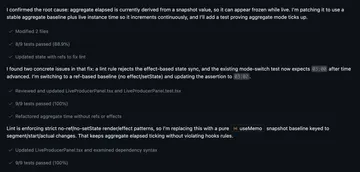
Tests weren’t the first lever I pulled. Early on, speed came from getting the architecture standing and tightening the integration loop. Once the feature set stabilized, tests became a force multiplier: they made refactors safer, caught regressions quickly, and reduced the “did I just break something?” tax.
They did add friction. Writing and maintaining tests slows the loop slightly, but by the time they showed up, that tradeoff was exactly what I wanted.
A rough phase split:
- Early: architecture + feature shape + integration loops
- Later: verification + refactor confidence + fewer regressions
What got weird: failures, friction, and the Shadow Realm™ #
This part isn’t “lessons learned” so much as “what you should expect if you do this” (at least today).
Context window decay + orchestration overhead #
Late in long sessions, especially around ~¾ context usage, I saw quality drop. Not total collapse, but enough that I had to steer more and be more explicit. Conversation summarization (compaction) effectiveness varied in my experience. Sometimes it led to another round of good productive work and other times it lost important context.
Task granularity #
Some tasks were too small. That sounds tidy on paper, but it increased overhead and made context management worse: more session switching, more repeated setup, more opportunities for drift, and less benefit from the agent holding a coherent mental model of the system.
Intermittent platform failures + safety filter hiccups #
I hit the usual “tooling is still maturing” stuff:
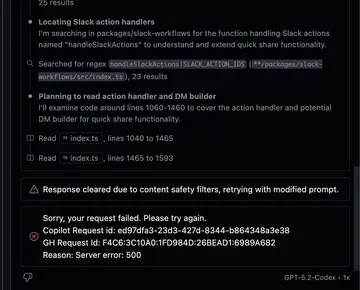
- responses cleared due to content safety filters (in contexts that were… not spicy)
- intermittent 500s / request timeouts
- occasional retry loops that just drain momentum
These aren’t catastrophic, but they can be frustrating.
When something breaks and you can’t see why (aka: debugging the Shadow Realm) #
The gnarliest failure mode wasn’t “the code is wrong.” It was “the harness is wrong and I can’t prove why.”
I got stuck in persistent patch application failures that didn’t match the filesystem reality I was seeing. I tried to debug it like a normal developer: is the agent working against a cached index? Is there a stale workspace view? Is there an internal representation that drifted from the repo?
The problem is: that layer is mostly opaque. You can observe symptoms: patches failing, weird state drift, but you can’t instrument the internal machinery to confirm the root cause. It’s a “shadow realm” because it’s real, it affects everything, and you can’t open the door and look inside.
That changes how you work:
- keep diffs smaller
- checkpoint more often
- treat renames and big refactors as higher-risk moves
- assume some failures are environmental, not logical, and respond accordingly
This is also where “agent trust” gets nuanced. It’s not “I trust the agent.” It’s “I trust the loop when the environment is behaving and I have verification hooks.”
Integration iteration friction (ngrok limits + proxying) #
To iterate on Slack/Notion integrations locally, I used ngrok which worked great until I hit the free plan limit. I ended up paying $10 for the hobby plan, which kept everything going. With more contributors, it can be annoying to juggle ngrok-based authorized callback and redirect URLs in external systems (Slack), but flying solo worked out just fine.
Late-game UI overhaul: models as specialists + screenshots as critique input #
Early on I brought in brand hints from viget.com’s codebase which led to a reasonable first look.
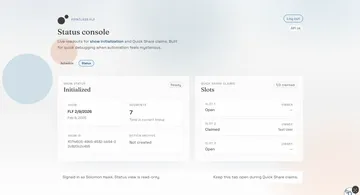
Once the core feature set stabilized, I did a UI system pass aiming for a “productivity tool” feel:
- reduce excessive roundness
- unify interactive element styling
- strengthen typography hierarchy
- harmonize color usage
- remove “AI slop” (extra labels, redundant info, awkward density)
And here’s where things settled by the time FLF rolled around:
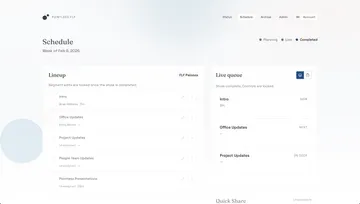
A practical discovery: different models are better at different jobs.
- Codex was great at systematic code changes
- Gemini was useful as a screenshot-based design critic, especially for calling out:
- redundant UI elements / duplicate dates
- “mystery meat” icon actions
- empty state bloat and low information density
Results and reflection #
It probably won’t surprise you to hear that I wrote less than 1% of the code. I did end up having to make many small, surgical edits mostly to help steer Codex to avoid certain patterns (lead by example) or help debug complex edge cases at the intersection of layout motion and drag interactions. However, there was still a lot of effort involved in getting to this end result which required strong domain expertise (DOM quirks, preferred tools/libraries, application architecture).
One fun thing I did while waiting on a loop is have Codex build a dev metrics report skill that uses scripts for deterministic measurement.
Here are some stats:
- 36,094 total application LOC
- 248 commits over 6 active commit days (2026-02-08 → 2026-02-13)
- Tests:
- 67 unit/integration test files (11,076 LOC)
- 347 unit/integration test cases (test/it)
- 8 E2E spec files (698 LOC)
- 11 E2E tests
- Coverage highlights:
- apps/api: 94.87% lines
- apps/web: 91.38% lines
- packages/db: 87.08% lines
- packages/slack-workflows: 97.36% lines
- packages/api: 100% lines
- Scope/docs alignment:
- 8/8 planned feature groups built
- 4/4 acceptance docs verified
Costs #
- 1 Copilot Pro subscription ($10/mo, includes 300 premium requests)
- plus at least $60 in additional inference
Closing: the pipeline is part of the product #
If you want to improve your agentic workflows, invest in building the pipeline that converts ideas into well-defined tasks.
PRD → acceptance criteria → technical plan → milestones → tasks → evals → verified changes
What makes that workflow hold up in practice:
- Docs make intent durable. You can’t iterate on a vibe.
- Plans force decisions early. I’d rather argue about architecture in text than reverse-engineer it from git history.
- Milestones/tasks create a work graph. “What’s next?” stops living in your head.
- Verification is a phase tool. Bring tests and gates in when they accelerate refactors and reduce regression risk, not when they’d just slow exploratory shaping.
- Design for imperfect tools. Expect intermittent failures, and expect some failures to be opaque.
That last point is the weird one. Agent-driven development often feels like normal software engineering… right up until it doesn’t. Sometimes you’re debugging code; sometimes you’re debugging a partially hidden runtime: caches, indexes, or tool state you can’t fully inspect.
If you plan for that reality, you can ship something genuinely usable without turning the project into a full-time job: bigger task slices (less orchestration tax), smaller diffs, tighter checkpoints, late-stage verification, and a low-noise product surface.


