Bringing Parakeet to Life: The Long Process of "Finishing It Up"

The 6-month process of getting an intern project over the finish line into a soundboard that YOU can use in your meetings. Here's what it took to bring Parakeet from "almost ready" to actually ready.
Avid followers of the Viget blog may remember the announcement of a particularly exciting-sounding Viget intern project called Parakeet back in August, which came with the promise that “it’s going to be available for everybody to use… eventually.“ I’m very happy to report that “eventually” has finally come!
In case you haven’t been on the edge of your seat the past 6 months waiting for it, you may be wondering, What is Parakeet?
Parakeet is both a digital soundboard website, where you can upload and organize sounds, and a Chrome extension, specifically tailored for Google Meet, to play sound effects in virtual meetings.
It was an ambitious project for the 2025 intern cohort. We set out to solve the problems of disorganized, unattractive soundboard websites and to make it easy to share audio in Google Meet (typically, you can only share audio by sharing a tab). It was a huge success!
On the very last day of the summer internship, the Parakeet website went live, and the extension had been submitted to the Chrome Web Store for approval. Parakeet was on the verge of taking over Google Meets everywhere!
Several weeks later, I joined Viget full-time and was glad to see that the extension had been approved. I was ready to send it off into the world, but my Viget mentors and colleagues suggested that Parakeet could benefit from a bit of polishing and user testing. There were rumors of echoing issues and a few features that weren’t so user-friendly. I was excited to dive back in and make some improvements!
This polishing and user testing effort officially kicked off Phase 2 of Parakeet Development: Finishing It Up. You know what they say about the last 20% of a project taking 80% of the time? Well, that was incredibly accurate in this case. Though in defense of the interns’ original timeline and scope, Parakeet did go from being the main focus of a dedicated, multi-skilled team of 5, to a professional development (and passion) project in between client work for a single developer.
So what did this 20% consist of?
Phase 2 started off with some repository housekeeping - things that a group of interns in a 3-week sprint weren't too concerned about - like writing a good README with set-up instructions and making environment variable templates. Next, I implemented authentication to keep users logged in long-term, which is very important for quick, convenient extension use. I also needed to build a new flow for adding default sounds to folders. At the last minute of the internship, we discovered a loophole where any user could edit default sounds, and when we fixed it, we accidentally took away the "add to folder" functionality too.
After getting things tidied up, I started planning out and running user testing sessions. I recruited a couple Viget employees and got them set up with a sneak peek version of the extension. I went into testing convinced that the echo ‘rumors’ were just user error (aka I was extremely biased towards my own work and feeling precious about the project). But by the second interview, it was clear that there was definitely an issue with echoing. I subjected my coworkers to horrible echo loops in the name of testing, and determined that the issue had been concealed before by the use of headphones. The echo problem turned out to be a fairly easy fix, thankfully, and not the potential collapse of our entire audio handling system that I’d feared.
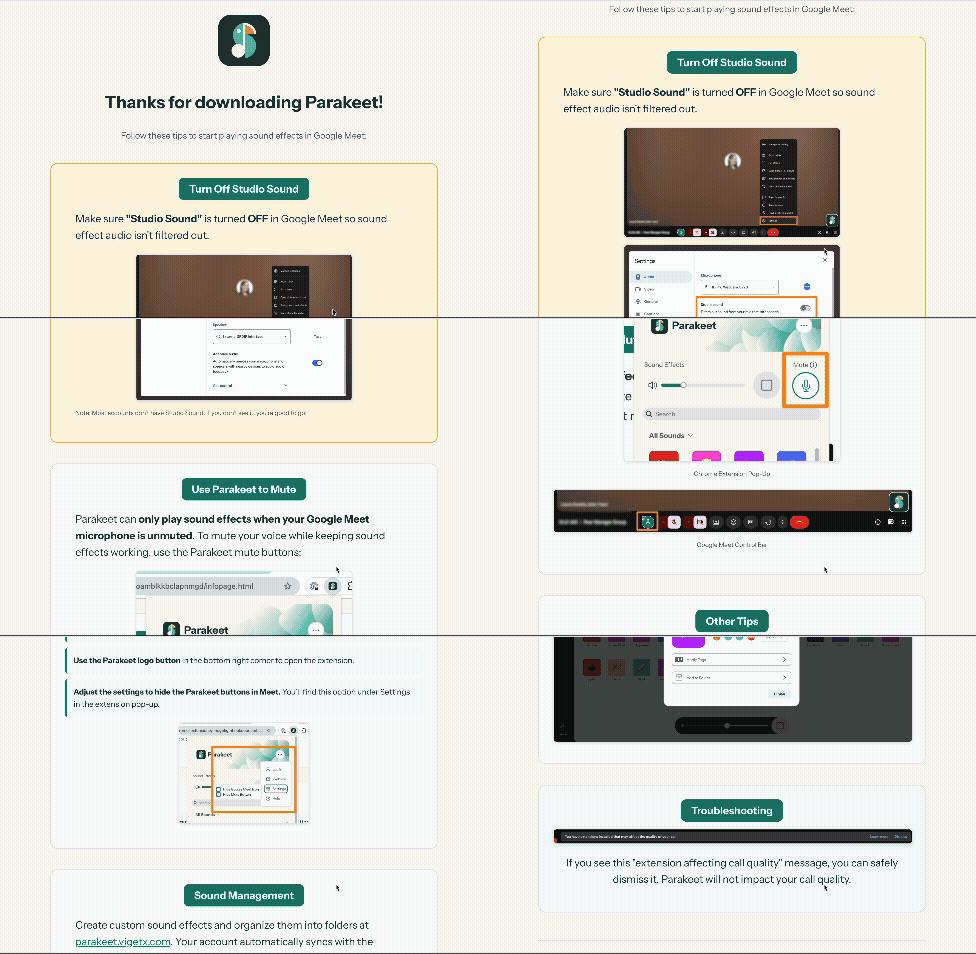
This user research exposed not just bugs, but opportunities for real usability improvement. One of the most important findings from the user testing interviews was that the Parakeet mute functionality was confusing for new users. In addition to clarifying copy changes, I expanded the help page that opens when you first download Parakeet to include a tutorial that guides users through using the extension.
This led me towards another improvement – upgrading the mute system – aimed at power users. I added a button that appears in Google Meet, giving users the ability to mute and unmute through Parakeet directly within the meeting tab. Previously, users had to open the extension pop-up to mute/unmute, or to check whether they were muted.

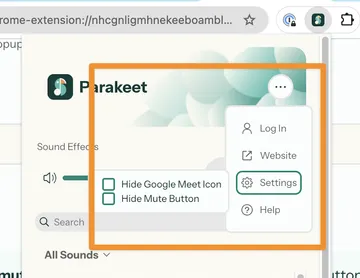
One of the final changes (which had been explicitly included in the original Phase 2 scope) was to add the ability to toggle the Parakeet buttons in Google Meet on and off, giving users more control over the display and preventing them from covering parts of the screen.
During Phase 2, I got the chance to try on each of the interns’ hats - I wrote a lot of TypeScript and GitHub issues, conducted user interviews, and iterated through designs and color choices in Figma. None of these are my specialty, or what I do on a daily basis here at Viget. But frankly, I’m young and not particularly specialized in anything, and at any point in your career it’s good to try new things, go out of your comfort zone, and be inspired to creation by a project or idea.
It would have been possible to keep refining Parakeet and pushing off the official release forever. Especially, because in addition to bug fixes and improvements, working on the Phase 2 process also inspired me. Small iterations led to major new feature ideas. A part of me wants to always keep the project in an “almost done” status and continue tinkering on it, safe from the real world. But it’s time. While Parakeet will continue to improve, it is now ready for public use!
To celebrate the release, several new default sounds were added to Parakeet, in collaboration with Parakeet’s official Voice Talent, Viget’s Tommy Ball. Just as there are a couple of niche Viget sounds on Parakeet, we hope that your company, organization, and D&D group will feel inspired to come up with your own fun sounds to make meetings brighter.


