Close and Go BackBack to Viget

Only You Can Prevent git Merge Commits

Clinton R. Nixon
Clinton R. Nixon, Development Director, February 12, 2010 12

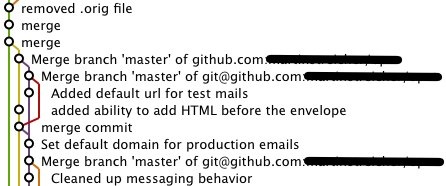
a set of merge commits

I love using Git, but when my repositories turn into a tangle of merge commits, I start to get a little frustrated. Here’s my solution. Go into your repo’s .git/config file and make sure it has something like the following:

[branch "master"]
  remote = origin
  merge = refs/heads/master
  rebase = true

Now, when you run git pull, it’ll rebase your local commits on top of the newly pulled-down commits instead of trying to merge them. Even better, try putting this in your global ~/.gitconfig file:

[branch]  
  autosetuprebase = always

With this change, all tracked branches from then on will be set up to rebase instead of merge.

Caleb Cushing ( xenoterracide ) said on 02/12 at 04:53 PM

Ooh… I didn’t know you could do that. Awesome… my advice has always been to rebase not merge unless it’s an ACTUAL merge… you shouldn’t be merging just to get remote code.

Ho-Sheng Hsiao said on 02/12 at 05:07 PM

Some people (like me) like to see the speghetti. Due to the way it works, rebase is riskier than merge, and is harder to correct when something goes wrong. If you’re going to create a movement to get people to default to rebase, you should add other habits such as pulling/rebasing into test branches first.

Anton said on 02/12 at 05:18 PM

Works ok if you all pull and push from a master repository. Not a very good idea if you’re working in a team that pulls from each other. See:

http://changelog.complete.org/archives/586-rebase-considered-harmful

Linus Torvalds on rebasing:
* http://kerneltrap.org/Linux/Git_Management
* http://lwn.net/Articles/291302/
* http://lwn.net/Articles/291303/
* http://lwn.net/Articles/291304/

Matt Mackall on synchronizing (pull + merge, don’t push, don’t rebase):
* http://www.selenic.com/pipermail/mercurial/2008-July/020116.html
* http://www.selenic.com/pipermail/mercurial/2008-July/020131.html

Apreche said on 02/12 at 05:22 PM

Merge commits my create spaghetti in your graphics, but they are very useful. Let’s say I have two branches. One has 5 commits that the other does not. If I fast-forward one on top of the other, it just moves the 5 commits over. If I want to revert, I have to revert five commits. If I merge with no fast forward, it creates the merge commit. However, using that one merge commit, I can easily revert the whole merge, etc. Of course, the other five commits are still there.

Even if rebasing or merging ends up with the same resulting code, having that extra commit gives you just one more piece of information, just one more has, to work with.

Lastly, if you are making lots of local topic branches and such, and you name them well, seeing those merge commits is super nice. merge branch ‘fixoffbyoneerror’, merge branch ‘addfancyfeature’. Suddenly those merge commits are looking nice.

Erik Ostrom said on 02/12 at 05:54 PM

What they said. Lately I’ve settled into a middle ground: For code from other people/repositories, I mostly merge, but I do rebase my local topic branches until they’re ready to merge into master. So far it’s working okay, spaghetti notwithstanding.

r said on 02/12 at 06:35 PM

I agree with the above, blindly rebasing everything can be dangerous. Like Erik, I rebase local working branches for convenience sake but will use $ git merge --no-ff to create merge commits that are meaningful.

r said on 02/12 at 06:38 PM

FYI,

If you wanted to selectively rebase on pull (and not make it global like above) use the following:

$ git pull --rebase

HTH

Clinton R. Nixon said on 02/12 at 08:12 PM

@Anton: you make a very good point. And everyone who mentioned local feature branches: also a good point. I tend to merge --squash them.

xilun said on 02/13 at 02:09 PM

Branches and merges do contain valuable information: they record the flow used to develop the software, they clearly state that commit x depends on commit y and typically records the exact version which has been used by the developer to write commit x. This is a huge advantage over subversion and the like, which pretend in their history that the software was always written with absolutely no parallelism.

When you rebase or cherry pick, you lose that valuable information. This can be OK in some very specific situations, when this is the result of a voluntary deliberate non-default action. But rebasing by default when pulling… please just don’t advise that to innocent developers. I admit this might work and present some advantages in some very specific environments, like different peoples working on very different components with little and well defined interactions between said components, and everybody knowing very precisely what others are doing. But this situation is not the general case. It’s even very far from what I would consider a typical situation in the software industry.

Caleb Cushing ( xenoterracide ) said on 02/14 at 01:00 PM

you all are saying it contains information. I disagree… when all you are doing is updating your remote tree a merge contains absolutely no information. and if you’ve patched it and you aren’t rebasing you’ve made a merge more required to pull into the mainline. merges are good when they contain useful information… like a deliberate fork of the code for a feature, or fix, not just when you are doing your daily update from the remote repositories. although git is distributed there isn’t a need to actually treat everyone’s code base like it is there own private fork… better to treat it as a base off the mainline. I like to see intentional patches and merging… e.g. cherry-pick, rebase, and merge are good. if you do it too much those merges just becomes noise.

Travis said on 02/16 at 11:54 AM

There are times to rebase and times to merge.  Take a look at this article:

http://gitguru.com/2009/02/03/rebase-v-merge-in-git/

Clinton R. Nixon said on 02/16 at 02:20 PM

Travis - thanks for that article. It’s a good read, and definitely shows some reasons to use merge.

Commenting is not available in this weblog entry.

We're the Developers

at Viget Labs. We write about web development trends, tips, best practices, industry events, and our projects — all with an emphasis on Ruby on Rails.

Recent Comments

Thanks for getting this together. I’ve been wanting to use Git or a least know how to use it and you’ve helped me a great deal. I’m still not sure though if it’s my best option for VC on my personal website. I do like the launch, open, cp & move files from my terminal. Looking forward to seeing more posts from you in the future.

Hasta la pasta.
®

Contact Us

Have any questions, comments, ideas, or secrets to share? Let us know.


How many days in a non-leap year?

Sorry, you need to have Javascript enabled to use this form. (Don't blame us, blame the spammers!) If you'd like to contact us, please visit our Contact page.